Read and reply to customer messages.
View conversations in a shared workspace, search your inbox and send replies in the customer service window.

SARA BiT YUTI · WHATSAPP BUSINESS
Use SaraBiT Yuti as WhatsApp sender software for approved template campaigns, customer conversations and team follow-up. Connect an eligible WhatsApp Business account, choose relevant contacts, and keep replies visible to your team. Meta messaging charges may apply separately.
Ask Yuti to prepare a campaign, reply to a lead and send a quotation. Follow it all in one conversation.
Yuti connects with WhatsApp Business so your team can read and reply to customer conversations, manage message templates, and prepare scheduled campaigns for contacts in shared lists. As WhatsApp sender software, Yuti keeps campaign activity, incoming replies and team follow-up close to your organisation’s contacts and everyday work.
View conversations in a shared workspace, search your inbox and send replies in the customer service window.
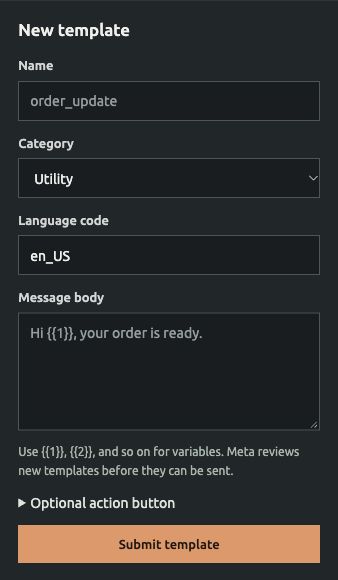
Sync templates from Meta, review their approval status and use approved templates to start conversations.
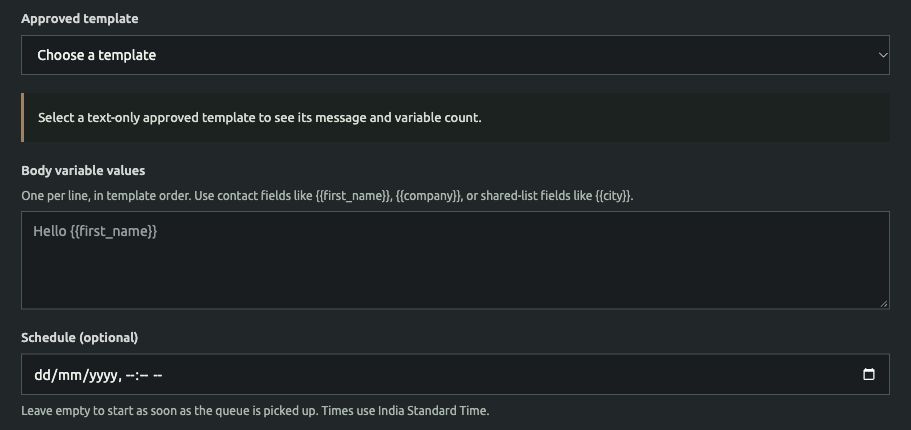
Choose a shared contact list, personalise template variables, schedule a campaign and follow sending progress.
INSIDE YUTI WHATSAPP
Prepare your message, personalise the template and choose when it should send. These controls sit alongside your everyday WhatsApp work.
WHATSAPP BULK MESSAGE SOFTWARE
Yuti connects to a WhatsApp Business account and supports template-based campaign preparation from the organisation workspace.
WHATSAPP BUSINESS API FAQ
WhatsApp Business inbox and campaign tools are included in the listed Yuti starter packages. Connecting and using them requires an eligible WhatsApp Business account.
Yes. Prepare a campaign for a shared contact list using an approved WhatsApp template. Campaigns can be scheduled, and sending progress is tracked.
Outbound campaigns use approved templates, and you must confirm that selected contacts can receive WhatsApp messages. Follow Meta’s current policies and messaging requirements.
Yuti connects a WhatsApp Business account through its business integration. Account eligibility, messaging rules and any charges imposed by Meta remain subject to Meta’s terms.
ONE BUSINESS WORKSPACE
Bring WhatsApp customer conversations and campaign preparation into the same organisation workspace as your business email, shared files and contact lists.
Manage custom-domain email for your organisation.
Open the WhatsApp workspace ↗